Learn how to use ShipSaving's new "Buy Labels in Bulk" feature to automate quoting and purchase multiple shipping labels in one click.
Last update:
May 4, 2026
Managing a booming eCommerce business means handling hundreds of orders. If you are still clicking into every single order to purchase shipping labels, you are losing valuable time.
At ShipSaving, our mission is to make shipping as efficient as possible. That’s why we’ve upgraded our buy label workflow into a more powerful, automated experience: Buy Labels in Bulk.
Why Bulk Shipping Matters for Your Business
Manual data entry is the enemy of growth. Whether you are shipping 10 or 1,000 packages a day, purchasing shipping labels in bulk allows you to:
Reduce Human Error: Automated quoting based on default package settings.
Speed Up Fulfillment: Process an entire day’s worth of orders in minutes.
Lower Costs: Instantly compare the best rates across multiple carriers.
Key Features of Bulk Label Purchasing
Our new update, specifically designed for Pro Plan users, introduces several high-demand capabilities:
Real-Time Automated Quoting
The moment you open your Order List, ShipSaving goes to work. If your orders have default package dimensions and weights set, the system will automatically fetch real-time quotes. No more manual refreshing, just instant visibility into your shipping costs.
Multi-Carrier Price Aggregation
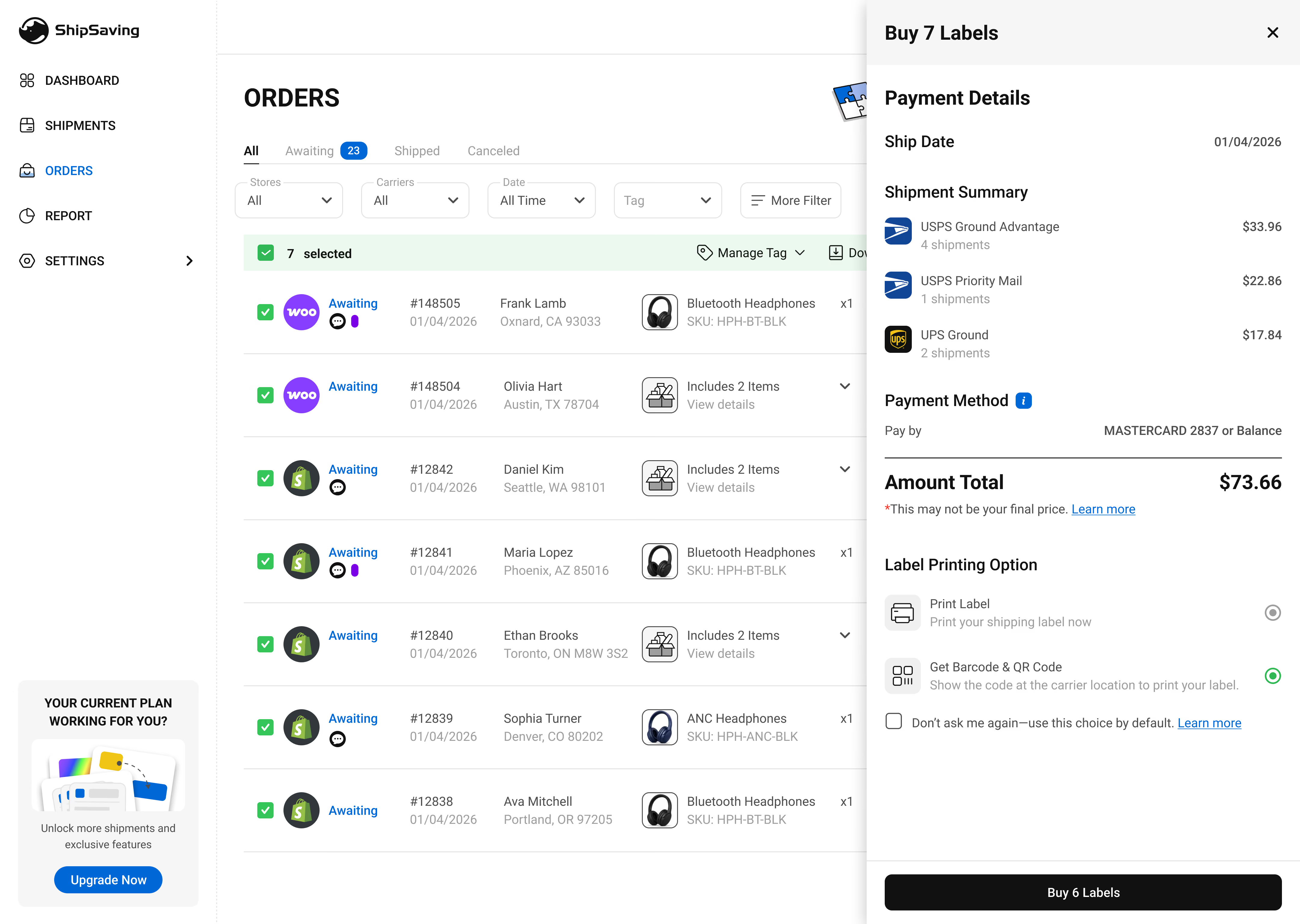
Select multiple orders, and our system will aggregate the costs. Even when buying in bulk, you maintain full control; each order is calculated independently, so you can still select different services (e.g., USPS Ground Advantage for one, UPS Ground for another) before checking out.
Streamlined Bulk Checkout
Once you’ve reviewed your rates, click once to buy. Our system handles the heavy lifting, processing multiple labels simultaneously with a clear progress bar to keep you informed.
How to Buy Shipping Labels in Bulk (Tutorial)
Ready to see it in action? Follow these simple steps:
Sync Your Store: Ensure your orders are synced from your store (Shopify, TikTok, eBay, etc.) to your ShipSaving dashboard.
Verify Order Info: Make sure domestic U.S. addresses and package details are complete.
Select & Quote: Check the boxes for the orders you want to fulfill.
Confirm & Purchase: Review the "Estimated Shipping" total and click the bulk buy button.
Frequently Asked Questions
Which shipping carriers are supported? The bulk purchase feature currently supports all major domestic U.S. carriers. (USPS, UPS, FedEx)
Can I use this for international shipping? Currently, "Buy Labels in Bulk" is optimized for domestic U.S. shipments. Orders requiring customs forms (such as APO/FPO/DPO addresses or territories like Guam and Puerto Rico) still need to be processed individually to ensure compliance.
What happens if a label fails to purchase? ShipSaving provides a detailed result page. If an order fails (e.g., due to an invalid Zip Code), the system will highlight that specific order while successfully processing the rest.
ShipSaving is an all-in-one shipping platform that provides discounted shipping for individuals and e-commerce. It allows users to integrate all sales channels in one place, seamlessly manage orders, and streamline the shipping process, helping shippers maximize their savings and efficiency.