

Last update:
Shipping within the U.S. hasn’t fundamentally changed in the past few years, but the tools we use and the choices we face definitely have. If you only ship occasionally, the number of services, delivery speeds, and pricing rules can feel overwhelming. And if you ship often, you already know that small decisions, like choosing the wrong box or entering the wrong weight, can turn into unexpected fees later.
This guide breaks the process into clear, manageable steps based on the actual workflow most shippers use today.
Most everyday items: clothing, books, accessories, and packaged home goods are fine to ship through all major carriers. Where people usually get into trouble is with:
UPS, USPS, and FedEx each maintain their own rules, and although most overlap, some details differ. When in doubt, a quick check of the carrier’s domestic restrictions can save time and prevent returns or delays.
Good packaging isn’t just about avoiding damage; it also affects the price you pay. UPS and FedEx are very clear about their preference for sturdy corrugated boxes, and USPS follows similar standards.
A simple approach works best:
Oversized boxes often trigger dimensional weight pricing, which means you may pay more even if the package is light. A right-sized box usually saves money and arrives in better shape.
Before selecting a service, you’ll need accurate package measurements. ShipSaving lets you enter dimensions and weight in the units you prefer, so you’re not restricted to inches or pounds.
Supported units include:
Use whichever unit system matches your scale or tape measure. ShipSaving will automatically calculate and return the correct carrier rates based on the numbers you enter.
A practical tip: always measure the outside of the box and round slightly up rather than down. That small adjustment helps prevent discrepancies if the carrier measures your package differently during transit.
Once your package is ready, the next step is entering the shipping details. This part is simple, but accuracy matters, especially for addresses. ShipSaving includes automatic address verification, so most mistakes (missing apartment numbers, invalid ZIP Codes, misspelled street names) are caught before you pay for a label.
Here’s what you’ll fill in:
Make sure apartment, suite, or unit numbers are included. Small omissions are one of the most common causes of delivery delays. ShipSaving will flag incomplete or non-mailable addresses, so you can correct them before creating the label.
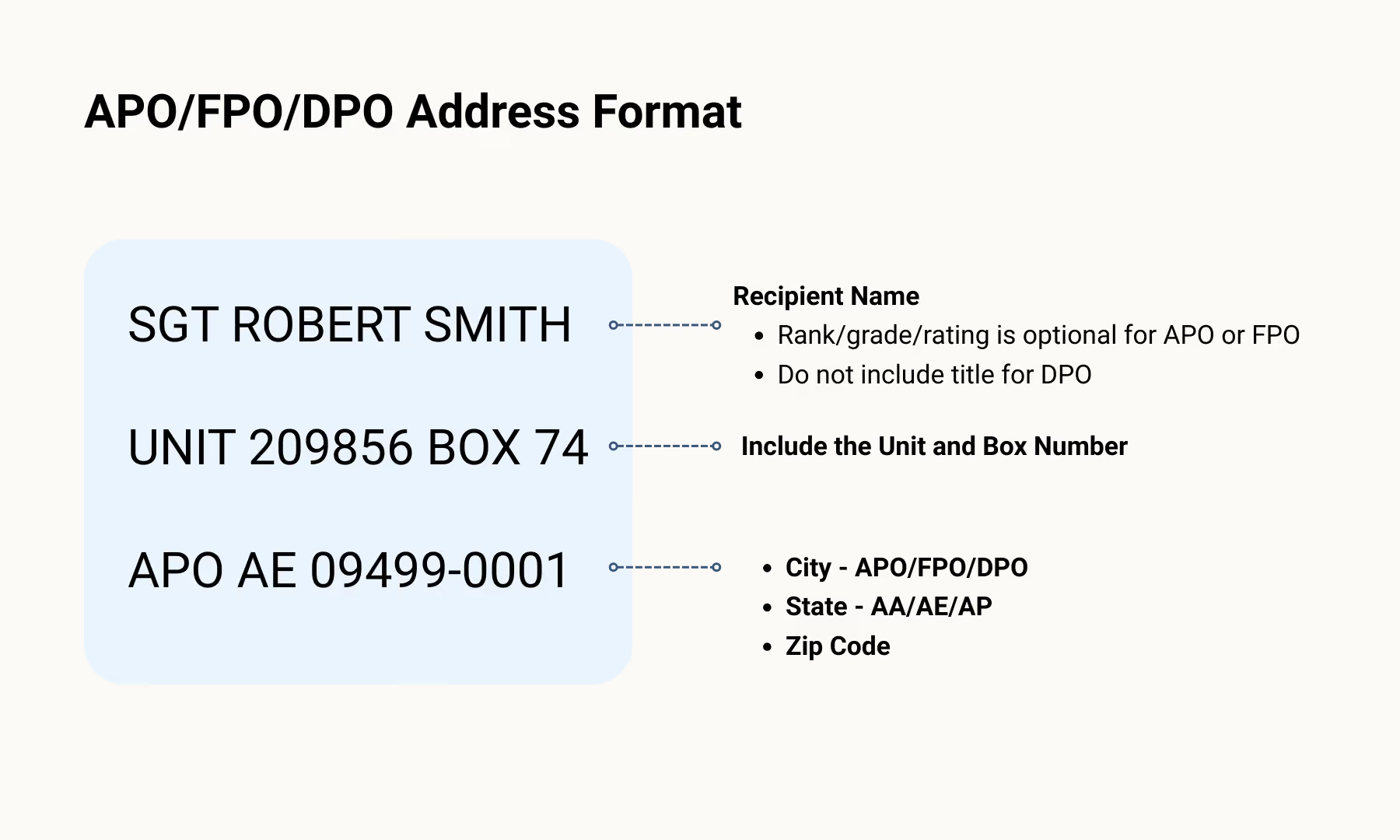
If you’re shipping to a military base, APO, FPO, or DPO, the addressing format is different from a typical U.S. Address.
Once everything is filled in, ShipSaving uses your data to run real-time rate calculations across UPS, USPS, and FedEx, giving you a clean, accurate comparison without leaving the page.
This is the point where people often feel stuck. Not because the options are complicated, but because it’s hard to know what each carrier is best at. Seeing all services side by side makes the decision much easier.
Here’s a straightforward way to think about each carrier:
Best for lighter packages and everyday residential deliveries.
Common services:
Strong for heavier boxes and consistent ground performance.
Common services:
Reliable for specific delivery windows and business shipments.
Common services:
Once you select your service and add any options, you can purchase your label.
Print the PDF label and attach it securely. Keep the barcode flat and readable.
All three carriers now offer printer-free solutions. ShipSaving can generate a scannable code you can take to a participating location to have the label printed for you. Just show the code at the counter, they’ll print the label and attach it to your package.
This is especially convenient for new shippers or anyone sending packages on the go.
Carriers offer several ways to hand off your shipment:
After the first scan, tracking begins and you’ll see updates throughout the delivery journey.
All carriers provide detailed domestic tracking. ShipSaving dashboard makes it easier to monitor multiple packages without checking separate websites.
If your shipment experiences delays or stops updating, checking the last scan time and location usually gives clues about whether the issue is weather, routing, or address-related.
Shipping in the U.S. becomes much simpler when you follow a clear process and use a tool that keeps everything in one place. ShipSaving lets you compare UPS, USPS, and FedEx in one view, validate addresses automatically, and use printer-free options when needed. You also get access to discounted carrier rates, which often makes shipping noticeably more affordable than purchasing labels at retail prices.
ShipSaving works on both desktop and the app, so you can create and manage shipments wherever it’s most convenient for you. When the workflow stays consistent, every shipment becomes easier and far less stressful to handle.
Written on: