
.avif)
Last update:
A USPS tracking page can tell you a lot, but only if you know how to read the status. One update may mean the package is still waiting for its first scan, while another may mean it is already close to delivery. This guide breaks down common USPS tracking statuses, explains why updates sometimes slow down, and covers why delivery exceptions happen and what to do next.
Shipping Label Created, USPS Awaiting Item: A USPS Tracking number exists, but the package has not yet been handed to USPS. Delivery timing will be assigned after USPS receives and processes it.
Shipping partner updates: These tracking statuses indicate that your package is still with a shipping partner and has not yet been transferred to USPS for processing.
USPS In Possession of Item: USPS has received or picked up the package and started processing it for transport.
In Transit / Arrived at USPS Facility / Departed USPS Facility: These updates show that the package is moving through the USPS network. Similar scans may appear more than once as it travels.
Forwarded / Forwarded Processed: The package is being redirected to a different address, usually because of a change-of-address request or a delivery routing issue.
Arrived at Post Office: The package has arrived at your Post Office and is being prepared for delivery. The package should arrive today or the next postal business day.
Out for Delivery: The package is with a local carrier and is expected to be delivered today, though not always at the same time as regular mail.
Available for Pickup: The package could not be delivered and is now available for pickup at the local Post Office. Redelivery cannot be scheduled.
Held at Post Office, At Customer Request: The package is being held at the Post Office at the customer’s request. Redelivery cannot be scheduled.
Awaiting Delivery Scan / Delivery Status Not Updated: A final delivery scan was not recorded by 9 p.m. local time on the day the shipment was marked Out for Delivery. USPS now expects delivery on the next business day.
Delivered: USPS recorded the package as delivered, including the delivery date, time, and location. If it cannot be found, it may have been left in a safer location, a parcel locker, or with a building office.
No Access to Delivery Location: The carrier could not reach the delivery location because of blocked access, animals, locked buildings, or other on-site conditions.
Insufficient Address / No Such Number: The delivery address is missing, incomplete, or incorrect, and the package is being returned to the sender.
Reminder to Schedule Redelivery of Your Item / Redelivery Scheduled: A redelivery has either been scheduled already, or USPS is reminding the recipient to schedule one before the package is returned to the sender.
Notice Left (No Authorized Recipient Available): The package required a signature, but no authorized recipient was available. USPS left a PS Form 3849 Redelivery Notice, and there will be no automatic second delivery attempt.
Notice Left (No Secure Location Available): The carrier could not find a secure place to leave the package and returned it to the Post Office. There will be no automatic second delivery attempt.
Unpaid Postage, Item Will Not Be Delivered: The required postage was not fully paid, so delivery will not be completed unless the postage issue is resolved.
Refused: The recipient did not accept the package when USPS attempted delivery.
Unable to Deliver Problem with Address: USPS could not complete delivery because part of the address was incorrect, incomplete, or invalid.
Dead Mail / Sent to Recovery Center: USPS could not deliver, forward, or return the package, so it was sent to the Mail Recovery Center in Atlanta, Georgia.
If your USPS tracking has not updated for a while, the package may still be moving. Tracking does not always update right away, and there are a few common reasons why that happens.
A shipping label may already exist, but USPS may not have completed the first acceptance scan yet. That can leave tracking in pre-shipment longer than expected.
After a package leaves one USPS facility, there may not be another tracking update until it reaches the next one. That means the tracking page can stay the same for a while even though the shipment is still moving.
During busy periods, packages can keep moving even when the next scan has not shown up yet. In some cases, a scan may appear late or get skipped, which can make tracking look stuck even though the shipment is still on the way.
When USPS handles a large volume of shipments, package movement and scan updates may not appear at the same pace. This is more common during peak seasons and other high-traffic periods.
If a barcode is damaged, covered, or hard to scan, USPS equipment may not record the update correctly. That can cause gaps in the tracking history even when the package is still in transit.
If scanning equipment is not working properly or tracking data is uploaded late, updates may take longer to appear.
Hurricanes, flooding, earthquakes, wildfires, and other severe conditions may disrupt transportation and delay tracking updates.
Airport delays, road closures, and other transportation issues can create longer gaps between scans.
USPS offers limited scanning on Sundays, and full updates may not appear until the next business day. On federal holidays, USPS pauses the scanning.
Priority Mail Express, Priority Mail, Ground Advantage, and other services do not all move on the same timeline. The following chart outlines the delivery standard for various mail classes.
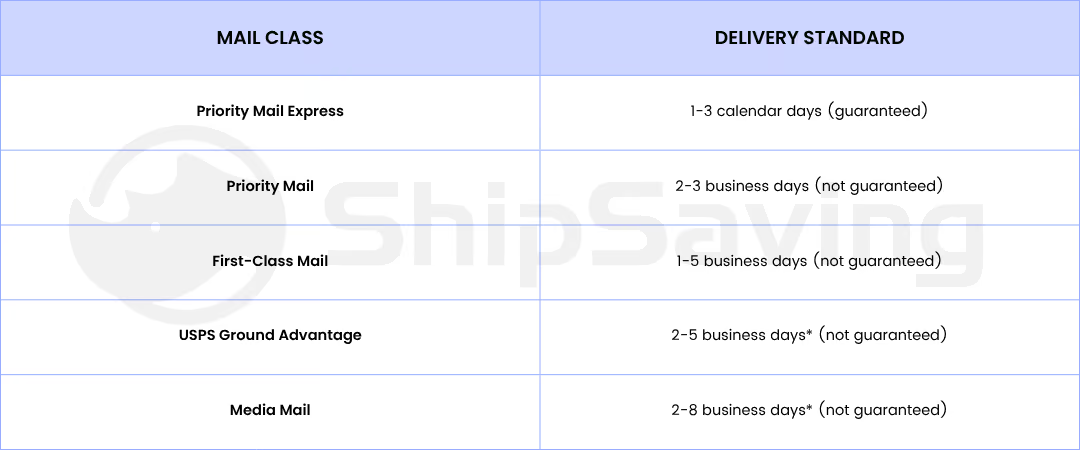
Note: *Delivery estimates do not apply to Alaska, Hawaii, or U.S. territories. Visit the ShipSaving Quick Rate tool to estimate your delivery time.
Some USPS tracking updates mean more than a delay. They can show that the package did not move through delivery as expected. In those cases, the shipment has likely run into a delivery exception. A delivery exception means an unexpected issue delayed the normal delivery process. It does not always mean the package is lost, but it does mean delivery was interrupted.
Missing apartment number, wrong ZIP code, outdated address. Address validation at checkout eliminates most of these.
A carrier may not be able to complete delivery if there is no access to the building, mailbox, or drop-off area. Gated entry, blocked mail access, loose dogs, or other on-site barriers can all lead to a failed delivery attempt.
Some packages require a signature, which means delivery cannot be completed if no authorized recipient is available during the delivery window. In that case, USPS may leave a notice instead of completing the drop-off, and the package may need to be picked up or scheduled for redelivery.
If the carrier cannot safely leave the shipment at the address, the package may be taken back to the Post Office instead of being delivered.
If a label is damaged, missing, or hard to read, the package may be harder to route correctly. That can lead to delays, handling issues, or other delivery exceptions before the shipment reaches its destination.
When a delivery exception happens, the first step is to identify what caused the issue. The right response depends on whether the problem involves the address, delivery access, the recipient, or the label itself.
If tracking shows a delay or failed delivery attempt, send an email or SMS update early. Clear updates reduce confusion and cut down on status questions.
Some exceptions start with bad address data. Missing apartment numbers, invalid ZIP codes, or outdated address details can all stop delivery before the package reaches the customer.
A weather delay may only need an update. A failed delivery attempt may need pickup or redelivery instructions. An address issue may need correction. A damaged or lost package may require a claim, a replacement, or a refund.
If the tracking history still does not explain the problem, contact USPS with the tracking number and latest update. If the issue continues, the next step may be a Missing Mail Search request, a claim, or another formal follow-up.
If you need to look up or confirm a USPS tracking update, USPS provides several official options:
USPS tracking is more useful when you understand what each update is telling you. That includes knowing what common statuses mean, why updates sometimes slow down, and when a delivery exception needs follow-up.
Ready to make shipping easier? Sign up for ShipSaving to gain clearer tracking visibility, automate customer notifications, and stay on top of every shipment from label creation to delivery. Plus, save up to 89% on USPS shipping and start shipping smarter while lowering your costs.
Written on: